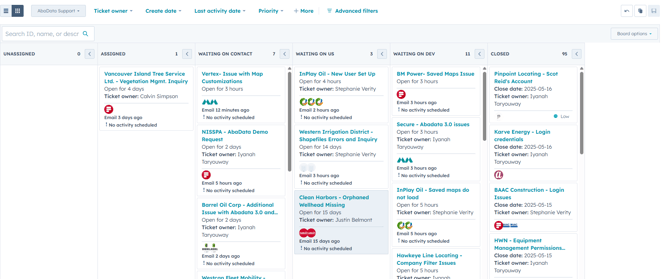
Column Descriptions
Unassigned
-
Meaning: These are new support tickets that have not yet been assigned to a team member.
-
Source: They often originate from the general support email (e.g.,
sales@abadata.ca), might be automatically forwarded from team inboxes, or manually created. -
Next Step: A team member needs to review and assign these to the appropriate support representative.
Assigned
-
Meaning: Tickets have been assigned to a specific team member but haven't been acted upon yet.
-
Next Step: The assigned support person should begin reviewing and addressing the issue.
Waiting on Contact
-
Meaning: The support team is waiting for more information or clarification from the client in order to proceed.
-
Next Step: Follow-up may be needed if the client hasn't responded. Resolution is on hold until the requested information is received.
Waiting on Us
-
Meaning: These tickets are waiting for a response or action from the support team.
-
Next Step: A support team member needs to review and provide a reply or take the necessary internal action to move the issue forward.
Waiting on Dev
-
Meaning: The issue is pending resolution by the development team, such as fixing a bug or completing an enhancement.
-
Next Step: Support may need to monitor development progress or update the client once the dev team has completed their task.
Closed
-
Meaning: The support ticket has been resolved and requires no further action.
-
Best Practice: Tickets should be closed promptly once resolved. There's no need to wait for explicit client confirmation unless specifically required.
Ticket Handling
Naming
All tickets must be named following this format: Company Name - Short Title.
Example: Northwind Land Resources - Disposition Filters Not Working
Support Categories
Broad Categories
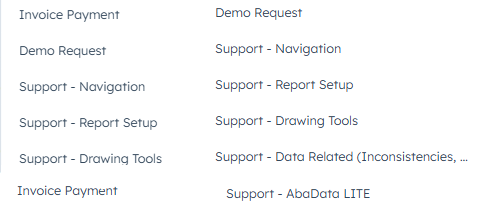
Subcategories
Feature Requests and Bugs - Subcategories are updated dynamically based on new items that come in. Ensure that tickets are tagged properly to be able to easily filter on the AbaData Support pipeline.
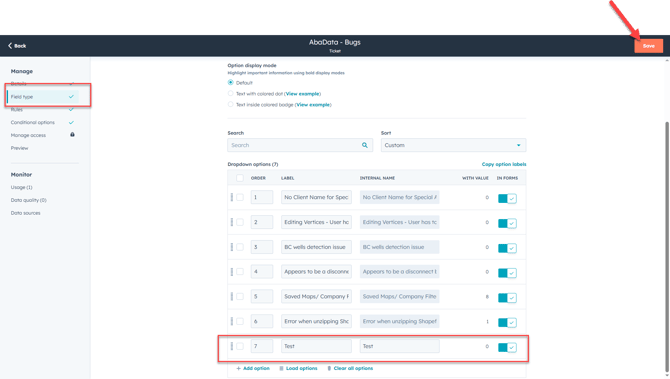
To add a new subcategory, edit the properties "AbaData - Bugs" or "AbaData - Feature Requests" on Hubspot. To do this:
(1) Search for Ticket Properties at the top of Hubspot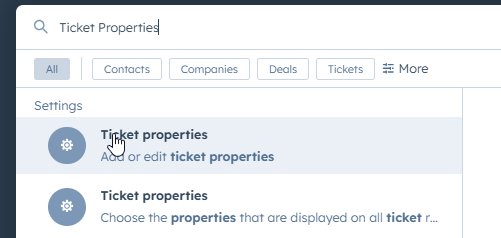
(2) Select 'Edit Property' to add a bug or a feature request to the list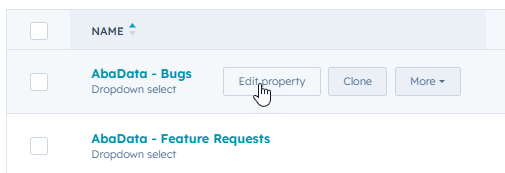
(3) Go to "Field Type", then, add a new label. Once done, click on SAVE