
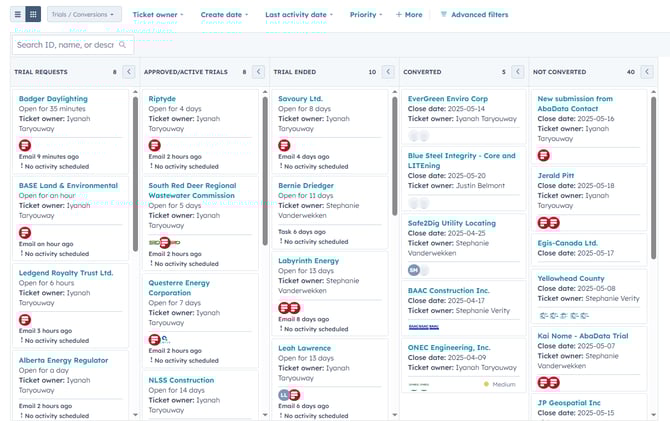
Each status on the board reflects a key stage in the trial-to-conversion workflow. Below is a breakdown of what each column means and what action to take.
Column Descriptions
Trial Requests
-
Meaning: Initial submissions from the Trial Requests form. Occasionally, these land in the AbaData Support pipeline and need to be moved here manually.
- Next Steps:
-
Move to "Trial Requests" if incorrectly routed to the support pipeline.
-
Send the template: “AbaData Trial Request – Additional Details Required” (personalize for the requester).
-
If no response, follow up using: “AbaData Trial Request – Follow Up for Additional Details”.
-
If no reply to follow up, after 7 days, move the ticket to “Not Converted” with reason: “Cancelled Trial Request”. (Note: ticket will reopen if the user responds.)
-
Approved/Active Trials
-
Meaning: The user has been approved for a trial and has received login credentials.
-
Approval Criteria:
-
Provided details about their role and industry
-
Unlikely to use AbaData for a one-off data download
-
Has not previously had a free trial with over 21 hours of usage
-
-
-
Next Steps:
-
Approve the trial and send login credentials from the dashboard
-
Move ticket to this status
-
Acknowledge any email with additional info
-
If a demo was requested, send calendar link for booking
-
A task will be auto-generated to follow up mid-trial
-
If no demo was requested, offer one at mid-trial
-
Use template: “AbaData – Mid Trial Follow Up”
-
-
Trial Ended
- Meaning: The user's trial has concluded. Ticket moves here automatically.
- Next Steps:
-
Check usage time:
-
If less than 21 hours, consider extending trial by 3–5 days (use discretion based on purchase likelihood) and notify the user
-
If user declines to subscribe, move to "Not Converted" with reason: “Trial Ended”
-
-
Converted
- Meaning: The user has decided to subscribe.
-
Next Steps:
-
Move ticket to this column
-
Create a deal on the AbaData New Subscriptions Deal Board to initiate the onboarding process
-
Not Converted
- Meaning: The user did not convert for one of several possible reasons.
-
Move to this status if:
-
Trial request was spam
-
Request was rejected
-
Trial request was cancelled
-
Trial ended without conversion
-
-
-
Next Steps:
-
Set the appropriate reason when moving the ticket here
-
No further action unless the requester re-engages (which will reopen the ticket automatically)
-
Here is a flow chart explaining our full trials/ conversions process
Handling AbaData Trials/ Conversions