![AbaData Logo-1.png]](https://support.oplynx.com/hs-fs/hubfs/AbaData%20Logo-1.png?height=40&name=AbaData%20Logo-1.png)
Tools Menu
Use the Tools menu to navigate the map.
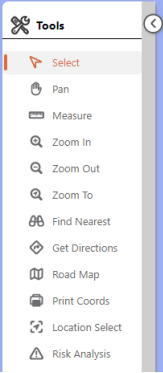
| Select Click to select individual objects on the map. Click and drag to select multiple objects. |
Find Nearest Click to find map objects nearest to a specified location. |
| Pan Click and drag to pan the map. |
Get Directions Click to get directions and show the route on the map. |
| Measure Click to open the Measure menu and measure area, distance or view the current coordinates. |
Road Map Click to create a road map. |
| Zoom In Click to use the Zoom In tool. |
Get Directions Click to get directions and show the route on the map. |
| Zoom Out Click to use the Zoom Out tool. |
Location Select Click to select map objects by location. |
| Zoom To Click to zoom to an address or map objects. |
Risk Analysis Click to generate a Pipeline Risk Analysis. |
 Tip:
Tip:
Select the Pan tool, hold Shift and click and drag a box on the map to zoom to the area selected.