
Navigating Surface Layers to show the data you need and filter out what you don't.
Click Map Display to control the surface layers displayed on the map. Additional options are available within each surface layer. By default, the Pipelines, Wells, and Terrain surface layers are selected.
You can use the sub-categories to adjust views related to Labels, Fly-Overs, Custom Lists, and more.
Surface Layer Search
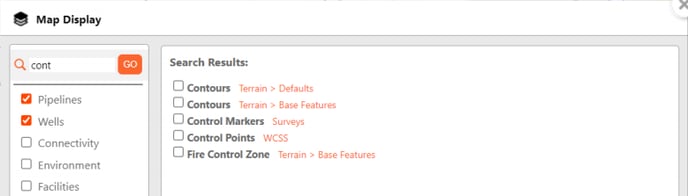
Use the Layer Search in the top-left corner of the Map Display menu to quickly search for and select from matching surface layer options. The orange text shows the location of each result.
Display Layers
| Pipelines | Wells |
| Environment | Facilities |
| Spills & Complaints | Surveys |
| Terrain | Utilities |
| Waypoints/WCSS | Custom Layers |